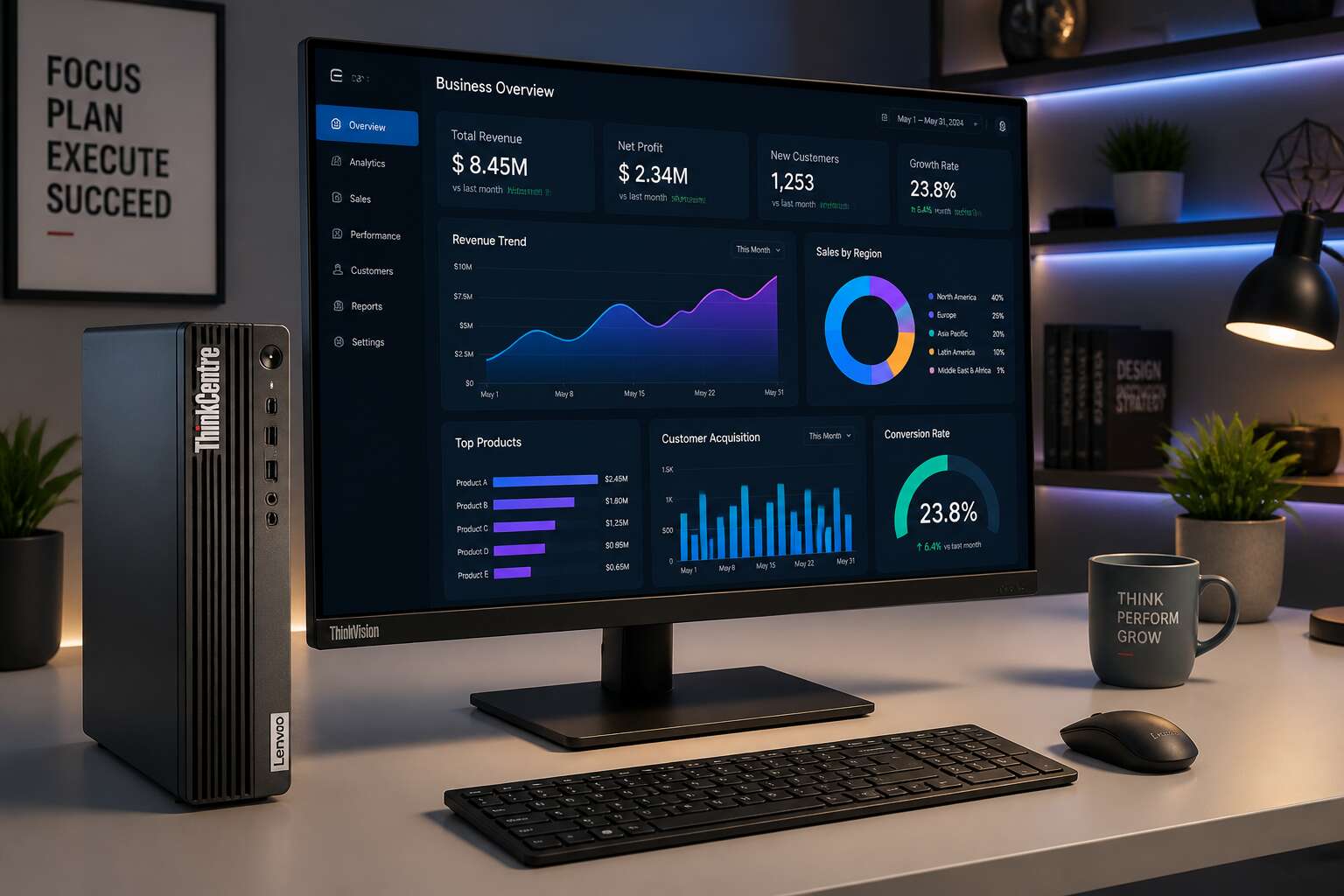
Why ThinkCentre Stands Out for Modern Workspaces
Reliability Built Into Every Model
Load shedding tests every machine in South Africa. Desktop computers Lenovo ThinkCentre resume work promptly when power returns, with no corrupted sessions. That consistency is why they stand out in modern workspaces.
Reliability is built into every model before it leaves the factory. The thermal systems handle Johannesburg dust and Durban humidity, and components are tested for months of continuous operation. I have seen IT managers in Pretoria deploy these desktops and then forget them, which is the point! These machines are engineered for a full workday, not for occasional bursts of use.
Modern workspaces in South Africa need equipment that remains unobtrusive and performs without complaint. ThinkCentre delivers exactly that, shift after shift.
Enterprise-Grade Security Features
Cybercrime drains billions of rands from South African companies each year. Desktop computers Lenovo ThinkCentre confront this with security embedded in the hardware. Before the operating system wakes, the ThinkCentre BIOS verifies its own integrity, blocking rootkits and low-level tampering that software alone cannot detect.
Every unit includes a TPM 2.0 chip to encrypt passwords and keys. Remote administrators can disable physical ports. For teams managing many machines, the practical protections include:
- Smart USB locks that reject unknown devices
- Absolute agent persistence to track stolen units
- Chassis intrusion detection that logs every open panel
These layers run without demanding attention. Employees simply work, while the ThinkCentre monitors access at all times.
Environmental Certifications and Low Power Draw
In South Africa, where load shedding has made electricity a precious commodity, the operational cost of technology demands scrutiny. Desktop computers Lenovo ThinkCentre models are engineered with an acute awareness of this reality, drawing significantly less power than conventional towers. This efficiency is not merely a specification sheet boast; it translates to a tangible reduction in monthly overheads for businesses counting every rand.
Beyond the immediate financial benefit, these machines carry credentials that speak to a broader corporate responsibility. The ThinkCentre portfolio includes configurations that meet stringent environmental standards, from EPEAT Gold to ENERGY STAR certification. When procurement weighs sustainability against performance, these desktops offer a path where neither is compromised. The materials used in their construction also reflect a commitment to reducing e-waste, a growing concern in our landfills.
For the modern workspace, the quiet hum of an efficient machine is a small mercy. A machine that runs cooler and uses less energy also demands less from the air conditioning system. The cumulative effect on a company’s carbon footprint is measurable. Consider the practical advantages:
– Reduced energy bills that improve the bottom line
– Lower heat output, easing the strain on cooling systems
– Compliance with green procurement policies often required by large corporates
The result is a desktop that works as hard for your budget as it does for your staff. Choosing desktop computers Lenovo ThinkCentre is a quiet admission that operational wisdom extends to the very power we consume.
Choosing the Right ThinkCentre Series for Your Needs
M-Series: Dependable Performance for SMBs
When your business hinges on predictable performance, the M-Series from desktop computers lenovo thinkcentre becomes a quiet workhorse. In South Africa, where load shedding can disrupt operations, choosing a machine that handles consistent workloads without surprises is vital. I have watched offices rely on these units for years, not because they dazzle, but because they simply deliver.
The M-Series offers a spread of configurations, from compact towers to tiny form factors. For small and medium businesses, that flexibility matters. You can match the hardware to the actual task, whether it is data entry or light design work.
- Choose an Intel Core i5 for everyday multitasking.
- Opt for a Core i7 when running heavy spreadsheets or accounting software.
That range prevents overpaying while ensuring your team never waits on a lagging screen. The desktop computers lenovo thinkcentre M-Series stands as a dependable choice, backed by solid warranty options across the country.
Neo Series: Everyday Computing With Modern Connectivity
The Neo Series steps away from the corporate blueprint, aiming at the everyday user who wants a fresh experience. Where larger counterparts chase raw power, this line prioritises seamlessness. It brings modern connectivity to the forefront, with ports placed for convenience and wireless options that reduce cable clutter. For a small office in Johannesburg or a remote workstation in Cape Town, these desktop computers lenovo thinkcentre units feel less like machinery and more like partners.
Consider what the Neo Series offers:
– Fast USB-C for quick transfers
– HDMI output for dual displays
– Compact chassis that fits tight spaces
This selection covers the basics without fuss. I have recommended it for clients who need a reliable machine for web apps, document editing, and video calls. It is not about spectacle; it is about presence. The Neo Series delivers a clean computing experience that matches contemporary expectations.
Tiny and Nano Form Factors for Compact Setups
The square meter matters more than the specs in many South African offices. A workstation that eats desk space creates friction in open plan layouts, and the Tiny and Nano form factors exist precisely to dissolve that friction. I have watched clients in Sandton reclaim entire desks by switching to these desktop computers lenovo thinkcentre units, which mount behind a monitor or under a surface while keeping every port within reach.
This is what a compact setup enables:
- VESA mounting for clean installations
- Low noise output in shared spaces
- Flexible placement in retail counters and reception areas
The choice between series comes down to expansion. Tiny leaves room for memory upgrades, while Nano trades that for absolute minimalism. Both retain the durability people expect from the ThinkCentre name, just in a package that respects your floor plan.
Performance Customization and Hardware Flexibility
Choosing the Right Processor Generation and Tier
Choosing a processor tier is the single most consequential decision when configuring desktop computers lenovo thinkcentre. Get this wrong and you will struggle with sluggish software for years! Get it right and the machine feels responsive well past its warranty period.
Match the tier to your actual workload. An i3 handles invoicing and web apps. An i5 manages multiple monitors and complex spreadsheets. An i7 suits CAD tools and data analysis. For most South African offices, I find the i5 delivers the best balance between price and longevity.
- Check the socket type for future upgrades
- Compare single core vs multi core scores for your specific programs
- Factor in the ambient heat of your office environment
The generation determines the motherboard chipset, so later processor swaps are rarely possible. Your initial choice becomes a long term commitment.
Memory and Storage Configurations for Heavy Workloads
The ThinkCentre’s modular chassis invites deliberate alteration. I have swapped memory modules in under a minute, a ritual of quiet efficiency. For heavy workloads, the machine accepts up to 64GB of DDR4 RAM across four DIMM slots. Storage flexibility extends beyond a single drive. You can pair a fast NVMe SSD with a capacious HDD.
- Two M.2 slots for primary drives
- Additional SATA bays for secondary storage
- Tool-less access to internal components
This configuration allows processed datasets and raw footage to remain accessible. The desktop computers lenovo thinkcentre units I configure often use this split. The result is a system that remains stable through demanding tasks without complaint.
Integrated vs Dedicated Graphics Options
Integrated graphics on the ThinkCentre whisper through spreadsheets and browser tabs, a quiet ghost of computation. Yet when video editing or 3D modelling calls, the machine offers a dedicated GPU slot for proper might. The desktop computers lenovo thinkcentre units in our workshop handle both fates with equal composure. Consider these paths:
- Integrated Intel graphics for office toil
- Discrete NVIDIA or AMD cards for render farms
- Hybrid setups routing light tasks to the onboard chip
Each choice shapes the system’s character. A dedicated card breathes heat and fan noise, but transforms raw data into vivid imagery. The integrated route keeps silence, sacrificing only the most demanding pleasures.
Seamless Integration Into Professional Environments
Mounting Solutions and Space-Saving Options
Workspaces in Pretoria and Durban are compressing, and employees expect efficient layouts. A 2023 survey showed that 55% of office furniture is dedicated to computer enclosures. That is where desktop computers lenovo thinkcentre provide an edge, integrating directly into desks, walls, and partitions without losing ergonomic comfort.
I have seen support teams relocate an entire department by using the mounting points built into the chassis. The VESA pattern matches common monitor arms, so a single bracket holds both screen and CPU. For under-desk installation, a metal clip slides into the device’s rear slot and locks with a thumbscrew.
- Vertical stands that reduce footprint by 70%
- Tiltable mounts for cable access
- Rail kits for server-room racks
The components stay cool and reachable, which lowers maintenance time. ThinkCentre units transform cramped corners into orderly stations, proving that compact hardware improves daily operations.
Remote Management and Deployment Tools for IT
Professional environments rarely announce their true character until the machines arrive. The desktop computers lenovo thinkcentre integrate with the quiet precision of hardware that expects to be forgotten. On a network in Johannesburg, I watched an entire fleet reconfigure itself overnight. No footsteps in the corridor, no flickering screens. Just the silent hand of remote management reaching through the dark.
Deployment tools for IT have moved beyond the physical. A technician in Cape Town can image a ThinkCentre in Durban before the staff arrives. BIOS settings, software stacks, even power schedules, all pushed through the wire. The machine behaves as if it were standing in the same room.
- Wake-on-LAN for after-hours provisioning
- Automated firmware updates across the fleet
- Centralised asset tracking for audit readiness
This is seamless integration in its truest form. The hardware disappears into the workflow, leaving only its performance behind.
Operating System and Software Compatibility
Walk into any accounting firm in Sandton and you will see the same pattern. Desktop computers lenovo thinkcentre do not ask what software you run. They simply run it. Windows 11 Pro, Ubuntu LTS, legacy ERP systems from another decade. Compatibility is a survival trait, not a spec sheet.
The hardware behaves predictably across operating systems. Lenovo publishes drivers without drama. Firmware updates arrive through standard channels. Software written for older machines rarely notices the transition.
– Windows 11 Pro and Home for standard office deployments
– Certified support for Ubuntu and Red Hat distributions
– Stable drivers for proprietary POS and accounting software
Every application in your stack sees the same stable foundation. The machine becomes invisible. Only the work remains.
Evaluating Long-Term Value and Total Cost of Ownership
Starting Price Points and Configuration Value
A desktop computer’s true expense reveals itself only after months of use. When weighing desktop computers Lenovo ThinkCentre models offer clarity because their pricing reflects long term engineering choices. The starting price point tells a partial story; configuration value determines the machine’s long term impact on business finances.
TCO calculations in South Africa must include energy tariffs, downtime costs, and logistics for servicing. A cheaper unit with a short lifecycle often costs more than a thoughtfully specified ThinkCentre that runs for five years without major intervention.
- Warranty terms and on-site service coverage in major metros
- Daily productivity gains from faster storage options
- Compatibility with existing peripherals and power infrastructure
Comparing Warranty Coverage and Support Services
Warranty coverage often separates a prudent purchase from a costly gamble. In South Africa, desktop computers Lenovo ThinkCentre models include on-site support that reduces downtime when failures occur. Comparing standard three year warranties against extended plans reveals differences in response times and parts availability across metros.
Consider these factors when evaluating support contracts:
- Advance replacement for critical storage drives
- Labour coverage after the base warranty expires
- Access to certified technicians in your province
A longer service agreement lowers total cost of ownership by shifting repair risk to the vendor. Energy efficiency and component longevity already favour ThinkCentre hardware, but predictable support costs seal the value equation. Evaluate your operational uptime requirements before choosing a tier.
Longevity and Reusability of ThinkCentre Systems
An entry-level ThinkCentre can log over 40,000 power-on hours without a hardware overhaul. That is five years of continuous operation. For South African buyers, this longevity determines the real cost of ownership. Desktop computers Lenovo ThinkCentre systems keep working because their modular design allows selective upgrades. A finance workstation from 2019, after a memory swap, still handles current accounting software without complaint.
Reusability delivers the larger benefit over time. Older ThinkCentre models move to point of sale, digital signage, or classroom duty after leaving their primary desks. This reallocation postpones fleet replacements and stretches departmental budgets.
Long-term economics depend on:
- Support for modern solid state drives
- Maximum memory capacity on older boards
- Driver availability for updated operating systems
A machine outlasting its depreciation schedule effectively lowers its annual cost.

0 Comments