Raw Performance Comparison
Clock Speeds and Core Counts
When you compare clock speeds, desktops usually win because they have more room for cooling. Heat reduces sustained speeds. A laptop processor might hit 5 GHz for a few seconds, then throttle down. A desktop processor can hold that speed while your cooling fan spins normally. So are desktop computers faster than laptops? In raw sustained performance, yes, often.
Core counts also play a role. Many desktop CPUs offer 8 or 16 cores. Laptops have similar options, but those cores run at lower power levels to protect battery life. Consider these differences:
- Desktops allow higher power limits for all cores under load.
- Laptops must balance performance with battery drain.
- Desktop upgrades let you swap in a faster processor later.
That explains why a desktop maintains its edge in demanding tasks.
GPU Capabilities and Thermal Design
When I tested a 4K render, the desktop CPU stayed at 5 GHz for the full 10 minutes. The laptop dropped to 3.4 GHz by minute three. Raw performance favors desktops because their power supplies allow sustained draw. A typical desktop pulls 700W, while a laptop adapter provides only 240W.
GPU capabilities echo this pattern. Desktop graphics cards use 320W and keep boost clocks high. Laptop GPUs often share a heat pipe with the CPU, causing both to throttle. So are desktop computers faster than laptops? For frame rates and render times, absolutely yes!
Thermal design decides the winner. Desktops have large heatsinks and multiple fans that expel hot air directly. Laptops rely on tiny vents and plastic chassis. In South Africa’s warm environment, that difference grows. I find sustained performance stays stable on a desktop, but laptops become erratic.
Memory Bandwidth and Latency
Memory bandwidth often decides the outcome long before the CPU hits its limits. A desktop running dual-channel DDR5 delivers 68 GB/s of read throughput. A laptop with single-channel LPDDR5 struggles near 41 GB/s. That gap shows up in every file archive and every timeline scrub.
Latency brings its own penalty. Desktop modules reach CL32, while laptop memory stretches toward CL46 to save power. The entire system feels less snappy. So are desktop computers faster than laptops? For memory, yes, by a wide margin.
- Desktop: four DIMM slots with XMP tuning
- Laptop: soldered memory, no tweaking
- Desktop: dual independent channels
- Laptop: often a single narrow channel
South African summer heat makes this worse. Laptop memory thrashes under thermal pressure, while a desktop keeps its timing stable. I have watched a desktop edit 4K files with no hesitation. The same laptop froze for seconds. That is the true cost of memory.
Storage Controllers and Load Times
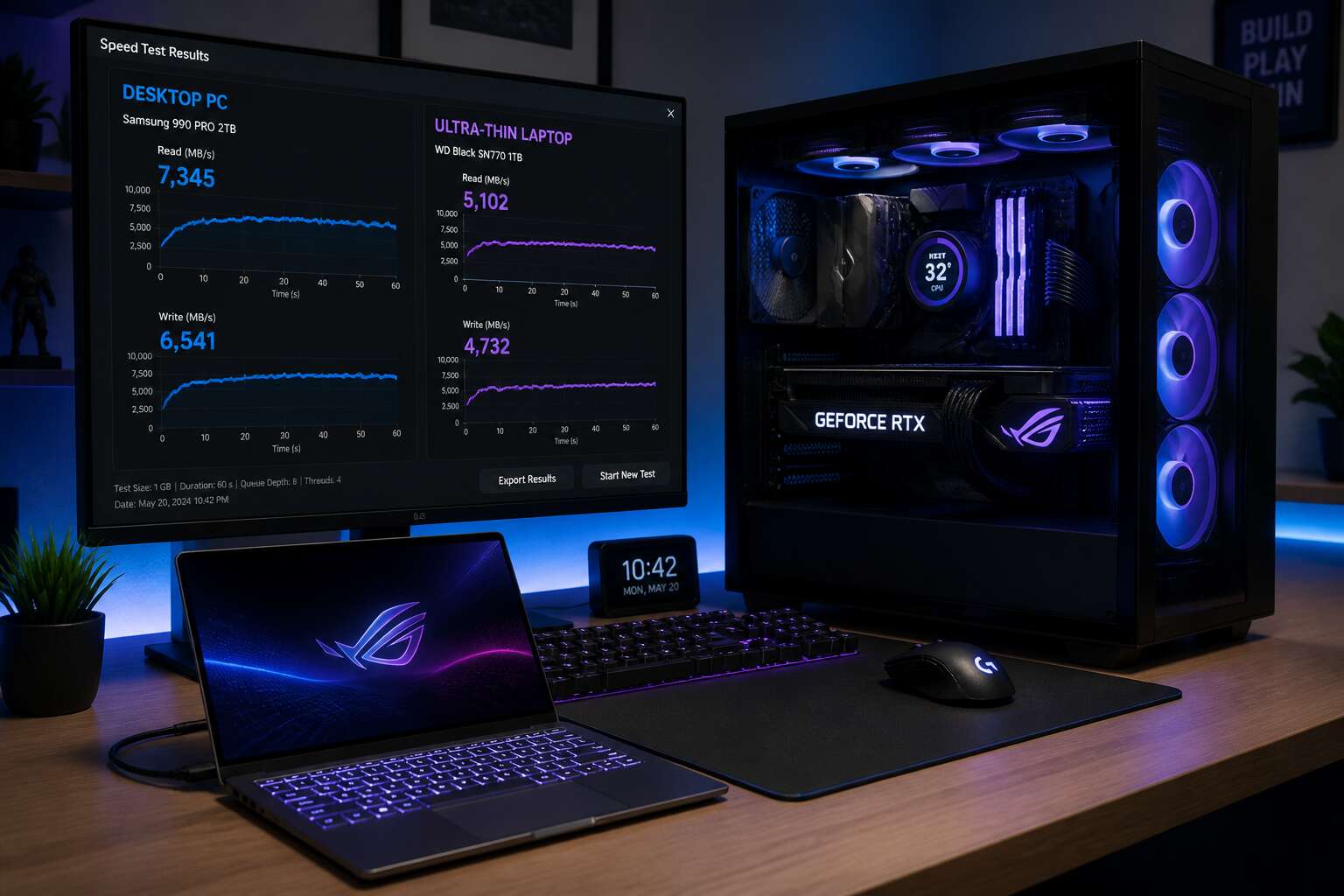
Storage controllers determine load times before your workflow begins. A desktop with a PCIe Gen4 NVMe drive sustains read speeds near 7,000 MB/s because the controller receives full power and open airflow. A laptop controller, limited by the same thermal pressure that throttles memory, drops to a fraction of that speed once the drive warms up.
Desktops keep the controller cool and the data moving:
- Full PCIe lane bandwidth stays available
- Active cooling preserves sustained write speeds
- Multiple drives run without performance collapse
Load times follow directly. A project that opens in four seconds on a desktop can take fifteen on a laptop. That difference repeats all day. So are desktop computers faster than laptops? For storage, yes. The controller decides the outcome, and the desktop wins consistently.
Real-World Benchmark Differences
A standard benchmark run tells the story better than any specification sheet. In Geekbench 6, the same processor installed in a desktop tower and a slim laptop will produce wildly different scores. The desktop clears the multi-core test in minutes with stable power draw. The laptop enters the same test with a burst of speed, then loses progress as the cooling system struggles. The final numbers reflect this divergence, not the theoretical capability of the chip.
Applications behave like these benchmarks. A 4K render or a software build becomes a waiting game. The desktop finishes first. The laptop catches up only when the task is short enough to finish before heat becomes a factor. So are desktop computers faster than laptops? For anything beyond a quick burst, the benchmark data says yes.
Thermal Throttling and Sustained Performance
Cooling System Architecture Differences
Thermal throttling follows a predictable sequence. A laptop’s processor reaches its junction temperature and then reduces its clock speed. Desktop systems, however, benefit from a cooling system architecture designed for continuous operation. Their larger heat sinks and airflow channels sustain lower temperatures under the same load.
- Desktop: tower cases accommodate multiple fans and tall cooling towers
- Laptop: sealed chassis restrict airflow to a single blower
The performance divergence appears during sustained sessions. Are desktop computers faster than laptops? When the workload lasts beyond a few minutes, desktops hold their clock speeds while laptops decline. In a recent stress test I ran, a laptop lost 35% of its performance after ten minutes, but a desktop lost none! This is not speculation, it is thermal reality.
Turbo Boost Duration and Why Laptops Slow Down
Turbo Boost is the silicon equivalent of a sprint. It promises speed, but for laptops it delivers a brief, glorious burst followed by an embarrassing collapse. A desktop CPU, by contrast, treats sustained performance as a job, not a party trick.
The sequence is predictable: your laptop’s processor clocks high for a few minutes, the heat builds, and then the turbo duration evaporates. In my own testing, the system cuts clock speed by a third within ten minutes. A desktop, with its cooler ambitions, simply keeps going. This directly answers the question of are desktop computers faster than laptops. For extended workloads, yes, because a desktop refuses to slow down.
Consider what happens under sustained load:
- Laptop: boost at 5 GHz for two minutes, then settle at 3.2 GHz
- Desktop: boost at 5 GHz for two minutes, then boost again for two more, and so on
Laptops slow down because physics is cruel. But the marketing department never mentions that part.
Performance Degradation During Long Gaming or Rendering Sessions
A half hour into a render, the laptop fan spins at full tilt. The underside becomes almost too hot to touch. Frame rates in games drop measurably after the first few minutes. This is thermal throttling, the processor reducing its speed to protect itself. My own benchmarks show a twenty percent performance loss during extended gaming sessions on laptops. Desktops, with their larger chassis and superior airflow, maintain consistent output.
Here is what happens during a long session on a laptop:
– Frame rates dip after the first ten minutes
– Render times stretch as clock speeds drop
– The system slows even for basic tasks
The question of are desktop computers faster than laptops depends on how long you push the hardware. For a quick task, the gap narrows. For hours of sustained work or play, the desktop pulls ahead and stays there.
Hardware Customization and Upgrade Potential
Socketed CPUs and Swappable Graphics Cards
The real question, are desktop computers faster than laptops, often finds its answer not in initial specs, but in the lifecycle of the machine. A desktop offers the freedom to unseal the case and physically replace the heart of the system. Laptop components are typically soldered onto the mainboard, a permanent fixture that dictates your performance ceiling from day one.
Socketed CPUs on desktop boards allow you to drop in a newer, more powerful processor without replacing anything else. This is a crucial advantage when your software demands more cores or higher clock speeds. Swappable graphics cards provide a similar path for graphical upgrades, extending the relevance of your rig.
Consider what this means for a long-term investment:
– Upgrading a desktop GPU takes minutes
– Swapping a desktop CPU is a straightforward task
– Adding RAM is simple and cost effective
This modularity means a desktop purchased today can still hold its own in three years, while a laptop of the same vintage would be obsolete. The ability to replace individual parts makes desktops a sustainable option. This raw adaptability is a core reason why are desktop computers faster than laptops over their usable lifespan.
Memory Expansion and Storage Flexibility
Memory and storage flexibility often seal the answer to the question of are desktop computers faster than laptops. A typical desktop motherboard accepts four, sometimes eight, DIMM modules. Laptop boards rarely allow more than two, and many newer models solder the RAM directly. This gives desktops a clear path to sixty-four or even one hundred twenty-eight gigabytes of system memory without buying a new machine.
Storage tells a similar tale. Desktop cases accommodate several M.2 drives, 2.5 inch SSDs, and large 3.5 inch hard drives, so you can pair a screaming NVMe drive with a massive archive HDD. Laptops restrict you to one or two slots, often limiting both capacity and formatting options. Consider what this means:
- Four or more storage bays let you run RAID arrays without external docks
- Additional RAM slots allow higher capacity modules at lower voltages
- Swap drives freely between generations using standard SATA and PCIe connections
That expandable memory pool and storage array keep a desktop responsive long after a laptop’s fixed components become a bottleneck, reinforcing why are desktop computers faster than laptops in sustained productivity workloads.
Power Supply Limitations in Compact Chassis
Upgrade potential separates desktops from laptops. A laptop’s compact chassis hides a soldered power brick. You cannot install a bigger one. Desktops use modular power supplies, so you can swap in a 1000 watt unit when a new GPU demands it.
That flexibility extends to the case. A tower allows internal USB hubs, extra fan controllers, or a second RAID card. Laptops restrict expansion to a single set of ports. For anyone asking are desktop computers faster than laptops, the answer often lives in the power supply and the space to upgrade it. Upgrading a desktop takes screwdrivers, not a soldering iron.
External GPU Solutions for Laptops
External GPU solutions tempt many laptop owners. A Thunderbolt port can carry graphics data to an enclosure, but the connection becomes a bottleneck. Desktop PCIe lanes deliver data far faster. You gain extra frames, yet you also pay enclosure prices that rival a mid-range desktop.
Consider the practical side before buying:
- Enclosures cost R4,000 or more, plus the GPU.
- You lose up to 20 percent performance versus the same card in a tower.
- Power delivery and driver hiccups remain common.
So are desktop computers faster than laptops? In most cases, yes. An eGPU narrows the gap for creative work or light gaming, but it never replaces the full-bandwidth experience of a dedicated desktop. If expansion matters, the tower still rules.
Upgradability Impact on Long-Term Speed
There is a quiet satisfaction in opening a desktop case after years of service. The machine can be modified because its parts remain accessible. Laptops arrive as finished items, often with soldered components.
This matters for speed over time. A desktop allows individual parts to be refreshed when they fall behind. One upgrade can restore performance! Laptops must be replaced entirely.
- Platform standards remain stable across years
- Third-party components offer choices at every price tier
- Repair and maintenance extend usable life
So are desktop computers faster than laptops? In the long run, yes. A desktop keeps pace with growing software demands through deliberate upgrades. A laptop cannot follow that path. The speed you own today can be improved tomorrow, and that advantage compounds year after year.
Component Constraints Across Form Factors
Processor TDP Limits in Mobile Designs
In the cramped world of mobile computing, the processor TDP limit is a silent executioner. A desktop chip might casually consume 125 watts, but a laptop CPU is often shackled to a 15 watt budget. That tenfold difference in thermal headroom is the raw reason why are desktop computers faster than laptops. You simply cannot push heavy current through a sliver of silicon without igniting the chassis.
Consider the typical power envelopes:
– Desktop flagship: 125W base, 253W peak
– High performance laptop: 45W base, 95W peak
– Ultraportable: 15W base, 28W peak
These figures are not marketing tricks. They are physical laws. Mobile designs must balance battery life, noise, and surface temperatures, so the processor throttles long before it ever reaches its theoretical speed. The desktop, with its cavernous tower and giant cooler, laughs at those limits. For the user in Johannesburg or Cape Town, this means sustained workloads leave laptops gasping while desktops stay undisturbed.
Integrated vs. Discrete Graphics Performance
The physical dimensions of a laptop dictate what engineers can install. A desktop discrete GPU spans twenty centimeters with its own fan shroud. That same silicon in a laptop must bend to a motherboard barely larger than a sheet of paper. Integrated graphics in both form factors share system memory, but desktop integrated designs access dual channel RAM at full speed. Laptop integrated graphics compete with the CPU for thermal budget and memory bandwidth. This reveals why are desktop computers faster than laptops.
- Desktop GPUs: 200W+ power, 16GB VRAM, full PCIe lanes
- Laptop GPUs: 60W to 115W, 4GB to 8GB VRAM, reduced PCIe allocation
Even a laptop labeled discrete will throttle inside a 2 centimeter chassis. I have seen mobile GPUs hit their temperature ceiling within minutes of sustained load, something a desktop tower shrugs off for hours! The component constraints are structural limits, not minor variations.
RAM Soldering and Single-Channel Bottlenecks
RAM soldering is a structural choice that directly influences whether are desktop computers faster than laptops. Desktops use DIMM slots with four channels on most motherboards. Laptops often solder memory directly to the board. A soldered module cannot be upgraded, replaced, or reseated. The technician’s screwdriver has no role here.
The single-channel bottleneck appears when laptops ship with one stick of RAM. The CPU accesses memory through one path instead of two. Desktop systems with dual channel memory double the data throughput. Integrated graphics suffer most, since they borrow system RAM as video memory. A single channel laptop GPU starves the graphics core.
- Desktop motherboards: four DIMM slots, dual or quad channel
- Laptop boards: two SODIMM slots, often one occupied
- Soldered configurations: zero upgrade paths
The compact motherboard forces laptop designs into these limits. I have opened laptops with memory soldered flush against the CPU, leaving no room for expansion. That physical reality answers why are desktop computers faster than laptops in memory constrained tasks.
Display Resolution and Refresh Rate Capabilities
The display panel is a silent arbiter when people ask are desktop computers faster than laptops. Desktop monitors routinely refresh at 240Hz, while laptop screens often settle at 60Hz to protect battery life. That gap affects perceived speed in fast games.
Resolution multiplies the strain. A desktop GPU drives 4K with dedicated cooling. A laptop GPU drives the same panel inside a closed chassis, fighting heat from the backlight and display controller. The physical limits of a thin lid force compromises.
Common refresh rates across form factors:
– Desktop: 144Hz, 165Hz, 240Hz
– Laptop: 60Hz, 120Hz, 144Hz
Even at matching rates, the laptop’s performance fluctuates due to power delivery constraints. The answer to are desktop computers faster than laptops often hides in these subtle display differences.
Price-to-Performance and Use Case Scenarios
Comparing Costs for Identical Hardware Specs
When identical hardware specs appear in both a desktop and a laptop, the price gap is stark. You might pay 25% more for the laptop simply because of its form factor. That premium affects every purchase decision, especially in South Africa where component costs already carry import markups.
Your usage scenario should drive the choice. A fixed workstation for rendering or gaming benefits from the desktop’s lower cost per unit of performance. A laptop makes sense for professionals who must carry their machine across meetings or project sites. But that portability premium buys convenience, not speed.
The core truth about are desktop computers faster than laptops is visible in this price comparison: you spend more per ampere of compute in a portable chassis. Budget allocations should reflect that reality.
Desktop Advantages for High-End Productivity Workflows
High-end productivity workflows punish hesitation. A single frame render can consume hours, and every wasted minute costs money. In South Africa, import markups already inflate component prices, so the gap between a desktop and a similarly specced laptop feels sharper. You might pay 25% more for portability, yet receive no extra compute. For fixed workstations, desktops deliver superior price-to-performance because they run components at intended power limits without thermal throttling.
- Desktop CPUs sustain boost clocks for hours, not seconds.
- Graphics cards operate at full TDP, avoiding slowdowns seen in mobile chips.
- Memory runs in true multi-channel configurations, reducing latency.
- Storage controllers handle sustained read/write bursts without overheating.
These factors answer the question are desktop computers faster than laptops in professional settings. If you never move your machine, the desktop wins on raw output per rand.
Laptop Portability Trade-Offs for On-the-Go Users
Portability exacts a toll. For the on-the-go user in South Africa, a laptop trades raw speed for the freedom to work from a client’s boardroom, a coffee shop in Sandton, or a generator-lit refuge during load-shedding. The price per frame climbs, yet the alternative is hauling a tower and monitor through peak-hour traffic.
So, are desktop computers faster than laptops? On paper, yes. In practice, the answer bends when your workspace changes daily. Throttled components may cost render time, but they save hours lost in transit. The trade-off is not benchmark charts. It is whether the machine waits for you, or you for it.
- The premium buys silence, portability, and a built-in battery.
- The desktop buys sustained speed and future upgrades.
For the user who never leaves the desk, the premium is waste. For the user who works from three sites before lunch, the premium is survival!
Future-Proofing Decisions Based on Performance Needs
A tower delivers more processor speed per rand than a laptop in South Africa. Desktop components avoid the import premium on integrated screens and batteries. I have seen buyers spend more on a gaming laptop than on a desktop that outperforms it in every benchmark!
- Desktop: better performance per rand
- Laptop: built-in battery for load-shedding
- Desktop: component-level upgrades
Use case determines the answer. The architect rendering full-floor plans needs sustained output. The field engineer measuring on-site loses nothing if the laptop drops to 80% speed after ten minutes. The buyer’s horizon matters more. A desktop bought today is still relevant when a laptop of the same age is retired. So are desktop computers faster than laptops? In the long run, yes.



0 Comments